HearMeOut - AAC Communicator
Table of Contents
- Loading table of contents...
This app is actively maintained
A symbol-based AAC (Augmentative and Alternative Communication) board that runs entirely in a browser. Tap symbols to build a phrase, then have it spoken aloud. Categories keep the board from becoming a wall of icons, edit mode lets you build your own vocabulary on the fly, and the whole thing works offline once loaded. No account, no install, no subscription.
Link to App
Why this exists
This one is personal.
I have non-verbal episodes - often enough that I started looking for a tool I could keep open on my device(s) and actually use. What I found in New Zealand was a brick wall: AAC software here is either expensive, gated behind an assessment, tied to a specific piece of hardware, or all three. There is no free, well-designed, browser-based option that does the obvious thing - let you tap symbols and speak.
So I made one. Not as a portfolio piece, not because the world needed another web app, but because I needed this one and couldn’t find it. If it’s useful to someone else in the same position, that’s the entire point.
Everything is free, everything runs client-side, and nothing leaves your device.
Screenshots
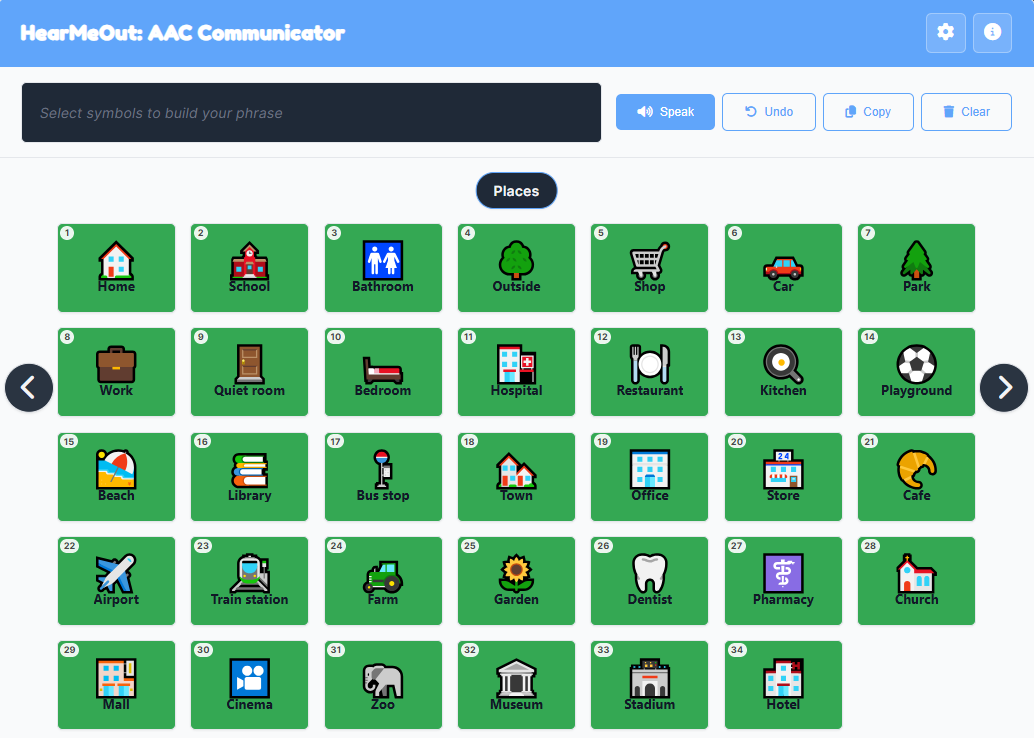
The board view: category indicator up top, symbol grid in the middle, phrase bar along the top with Speak, Undo, Copy, and Clear. A long-press on any symbol previews its speech without adding it to the phrase.
Features
- Tap-to-build phrase bar with drag-to-reorder chips, tap-to-remove, and keyboard reordering
- Speech synthesis for the whole phrase and for individual symbols via long-press preview
- Optional “speak as I build” mode - the tapped symbol speaks immediately
- Thirteen built-in categories, fully renameable and deletable, with symbol categories merging in automatically
- In-app edit mode: add, edit, and delete symbols without touching a text file
- Any image source for a symbol: emoji, an https:// URL, a data: URL, or an uploaded file
- Import and export as JSON, so a board can be shared, backed up, or moved between devices
- Real theming: light, dark, high-contrast, and auto (follows the OS)
- Grid sizing: auto-responsive, or fixed 3×4 / 4×6 / 6×8 for predictable layouts
- Keyboard navigation for everything: arrow keys change category, number keys speak cards, Ctrl+Z undoes
- Touch-first interactions: swipe left/right to change category, long-press to preview, drag to reorder
- Speech volume and voice selection, persisted per device
- Undo history for phrase edits (up to 50 steps)
- Copy phrase to clipboard as plain text
- Fully responsive, down to small phones
- Works offline after first load
- No accounts, no tracking, no server
How to Use
Goal: build a phrase, then have it spoken.
Controls:
- Tap a symbol: adds it to the phrase bar
- Long-press a symbol: speaks it without adding it
- Tap a phrase chip: removes it
- Drag a phrase chip: reorders it
- Swipe left/right on the board: previous/next category
- Left/right arrows: previous/next category (keyboard)
- Speak button: reads the whole phrase aloud
- Undo / Copy / Clear: as labelled
Keyboard shortcuts:
E- toggle edit modeCtrl+Z(orCmd+Z) - undo last phrase changeEnter/Space- add focused symbol←/→- previous / next categoryDelete/Backspace- remove the focused phrase chip1–9,0- speak card 1–10Ctrl+1–Ctrl+9,Ctrl+0- speak cards 11–20Alt+1–Alt+9,Alt+0- speak cards 21–30Ctrl+Alt+1–Ctrl+Alt+9,Ctrl+Alt+0- speak cards 31–40Escape- close the current modal or dropdown
Rules:
- Symbols live inside categories. Tap the category name at the top to jump to any category.
- Edit mode changes what a tap does: instead of adding to the phrase, it opens the symbol editor.
- Everything you change is saved to localStorage on this device. Export to move it elsewhere.
- The gear menu holds Add Symbol, Edit Mode, Save, Export, Import, Manage Categories, and Additional Settings.
Design Notes
A running log of how the app is built, what has been reworked, and what is still rough.
Click to expand
### File Structure The app is a Jekyll page, so the markup is a Markdown file with YAML front matter, but the app itself is plain HTML/CSS/JS with no build step and no dependencies beyond a Google Fonts import. The application code lives in `js/` as ES modules, loaded through a one-line entry stub. ``` hear-me-out/ ├── index.html ├── style.css ├── script.js ├── symbols.txt ├── manifest.webmanifest ├── sw.js ├── sw-core.js ├── icons/ │ ├── icon-192x192.png │ └── icon-512x512.png └── js/ ├── board.js ├── categories.js ├── config.js ├── dom.js ├── helpers.js ├── importExport.js ├── main.js ├── modals.js ├── phrase.js ├── settings.js ├── speech.js ├── state.js ├── storage.js ├── swipe.js ├── symbols.js └── toast.js ``` * **`index.html`** - The Jekyll page. Contains the header, the settings dropdown, the phrase bar, the board container with category navigation, four modals (edit symbol, manage categories, additional settings, info), and the toast. Loads `style.css` and `script.js` (as `type="module"`). * **`style.css`** - Everything visual: layout, theming tokens, symbols, phrase chips, modals, the board grid, responsive breakpoints, and a dedicated `prefers-reduced-motion` and `@media print` block. * **`script.js`** - A one-line entry stub: `import './js/main.js';`. Kept at the app root so it stays in the service worker's pre-cache list and in the manifest without special-casing this app. * **`symbols.txt`** - An optional default board loaded on first run if the user has no saved data. One line per symbol, semicolon-separated: `text;image;color;category`. The app falls back to an empty board with the default category list if the file is missing or malformed. * **`manifest.webmanifest`, `sw.js`, `sw-core.js`** - PWA plumbing. `sw-core.js` is the shared service worker body used across every browser app on this site; `sw.js` is the per-app shim that defines `CACHE_NAME` and pulls in the core. Only the entry stub is pre-cached, everything else is picked up network-first on first load. * **`icons/`** - PWA icons referenced by the manifest. The `js/` directory holds the application, split by concern: * **`main.js`** - The entry point. Wires up every event listener, runs the keyboard shortcut handler, and kicks off `init()` on DOM ready. This is the only module that imports from almost all the others. * **`config.js`** - Local storage keys, the max image size, the phrase-history cap, and the default category list. The only module that knows the raw constants. * **`state.js`** - A single exported object holding all mutable app state: symbols, phrase, history, settings, current category, swipe and drag bookkeeping, toast timers, and the modal stack. Centralising state means no module needs to hold its own copy. * **`dom.js`** - Cached `getElementById` lookups for every element the app touches, exported by name. Imported once, referenced everywhere. No module ever calls `document.getElementById` directly. * **`toast.js`** - `showToast()`, with the tracked visible/hide timers that prevent the overlapping-timer bug. * **`modals.js`** - Focus stack, focus trap, backdrop-click handling, and `openModal` / `closeModal` / `closeTopModal`. Modals register their own closers so `closeTopModal` can dispatch to the right handler. * **`storage.js`** - Everything that touches `localStorage` or `fetch`: load/save symbols, load/save settings, theme application, and the category list getter/setter. Also the only module that knows about `symbols.txt`. * **`helpers.js`** - `isUrl()` and `isImageSource()`. Small, pure, imported wherever needed. * **`categories.js`** - The category list, the ordered copy used for navigation, the indicator, the jump-to dropdown, and add/rename/delete. Category changes call back into the board renderer via a callback registered by `main.js`, avoiding a circular import. * **`symbols.js`** - The edit-symbol modal: open, close, save changes, delete, and the file-to-data-URL helper. Registers its board-render callback the same way. * **`board.js`** - `renderBoard()`, `applyGridSetting()`, and `animateCategoryChange()`. Builds every symbol node, wires tap, long-press, keyboard, and hover state. * **`phrase.js`** - The phrase bar: add, undo, clear, copy, drag-to-reorder, keyboard reorder, and `updatePhraseDisplay()`. * **`speech.js`** - `speakPhrase()` and `previewSpeak()`. Wraps `speechSynthesis` with voice lookup and the fallback path. * **`settings.js`** - The settings and manage-categories modals, the settings dropdown menu, voice population, and the modal handlers. This is where UI-only concerns live; the actual persistence happens through `storage.js`. * **`importExport.js`** - JSON export and import. Merges imported categories and symbols rather than replacing, and rewrites conflicting symbol ids on the way in. * **`swipe.js`** - Touch-only swipe navigation on the board container, wired to `animateCategoryChange`. No bundler, no transpiler, no framework. The browser loads `script.js`, which loads `js/main.js`, which loads the rest. Open the file, and it runs. ### Data and Architecture Everything is localStorage-backed. Symbols, categories, settings, voice choice, and the current category index are each stored under their own `cb.*` key. There is no server, no sync, no sync conflict, no migration problem - because there is nothing to migrate against. The app is deliberately stateful. A single `state` object (in `state.js`) holds the handful of mutable values that drive the entire UI: `symbols`, `currentPhrase`, `phraseHistory`, `settings`, `categoriesOrdered`, `currentCategoryIndex`, `isEditMode`. Every module imports that same object rather than keeping its own copy, so there is no possibility of two modules disagreeing about what the current phrase is. When any field changes, the relevant render function is called and the DOM is rebuilt from state. There is no two-way binding, no virtual DOM, no diffing. At this scale, a full redraw of the board (a few dozen nodes) is cheap, and it removes an entire class of stale-UI bugs that come from hand-patching pieces of the DOM. Functions are small and single-purpose. `renderBoard()` draws the symbols for the current category. `updatePhraseDisplay()` redraws the phrase bar. `renderCategoriesList()` rebuilds the manage-categories modal. Each one clears its container and rebuilds it. The cost is trivial, and the result is that I never have to ask "is this piece of UI in sync with state?" The split across modules is by concern, not by layer. `storage.js` owns persistence; `categories.js` owns the category list and navigation; `board.js` owns rendering; `speech.js` owns TTS. Two modules (`categories.js` and `symbols.js`) need to trigger a board redraw after they mutate state, and rather than importing `board.js` directly - which would create a circular import through `main.js` - they expose a `setBoardRefresh()` / `setRenderBoard()` callback that `main.js` wires up at startup. That is the only indirection in the app, and it exists purely to keep the module graph acyclic. The category system is a flat array of strings. Symbols reference their category by name, not by id. Renaming a category walks the symbols array and rewrites the ones that matched. Deleting one reassigns affected symbols to `Basic Communication`. There is no referential integrity problem because there are no references - just strings that happen to match. ### Symbol System A symbol is four fields: `{ id, text, image, color, category }`. `text` is what gets spoken. `image` is either an emoji (a single character or two), an http(s) URL, a data: URL, or a base64 data URI from an uploaded file. `color` is the background tint. `category` is the string name of the category it lives in. That is deliberately loose. The same rendering path handles an emoji symbol, an SVG URL, and a 200KB uploaded JPEG without any branching beyond `isImageSource()`, which just checks whether the string looks like a URL or a data URI. If it does, render an `Change Log (26 Sep 2026)
A significant rework was done. Everything below is in the current version.